Beoconnect Core - Visual application problem

3 replies
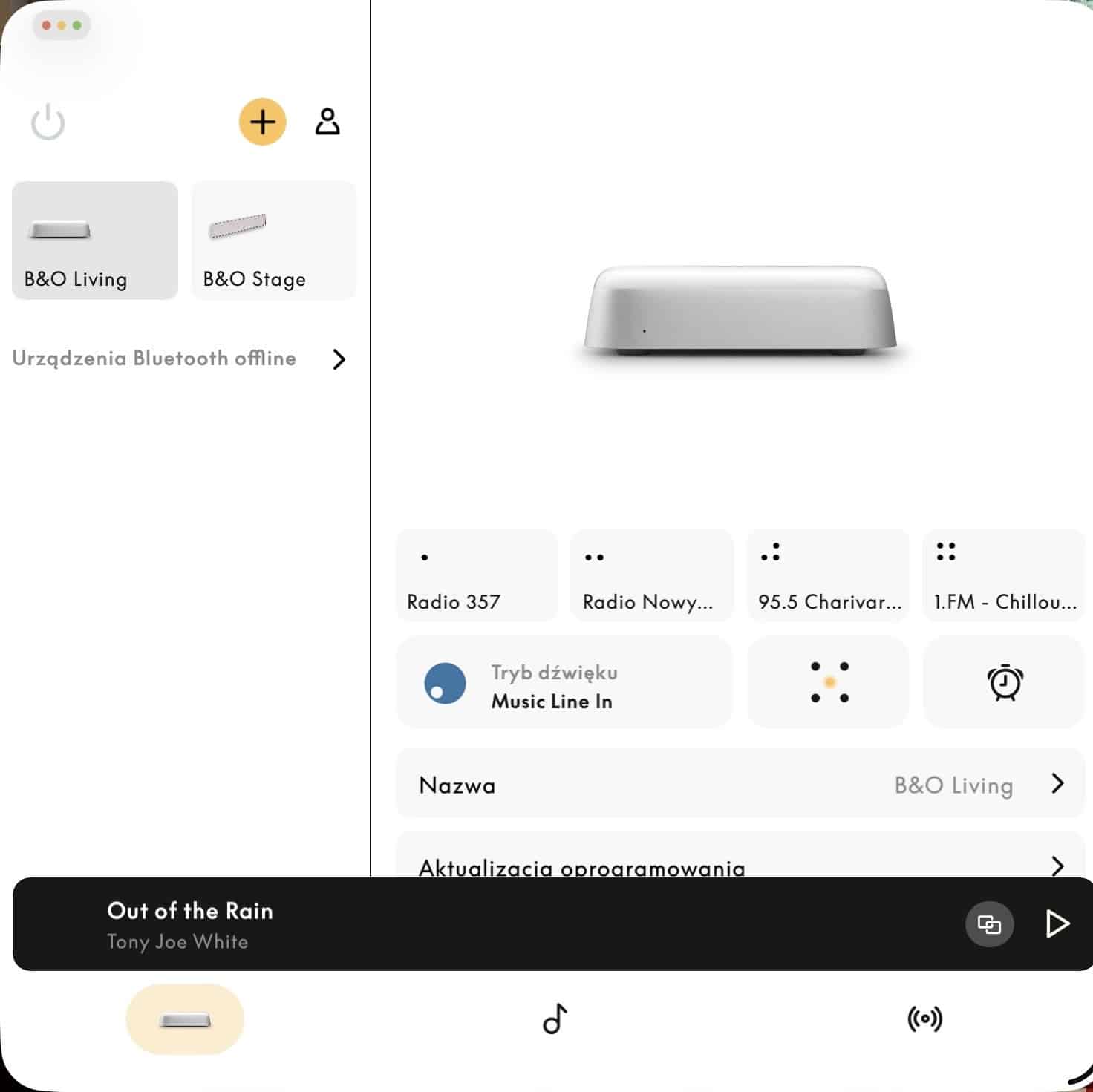
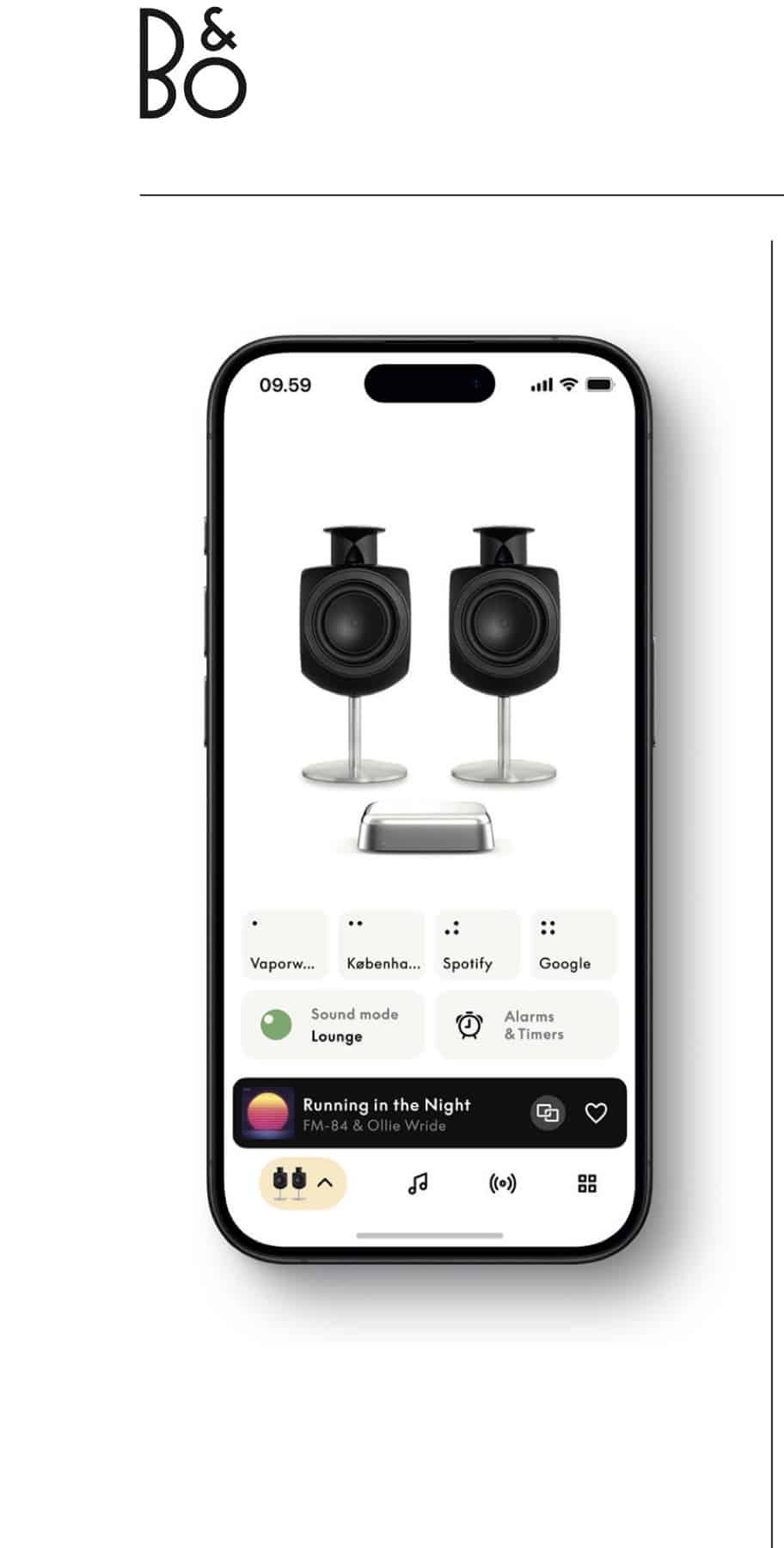
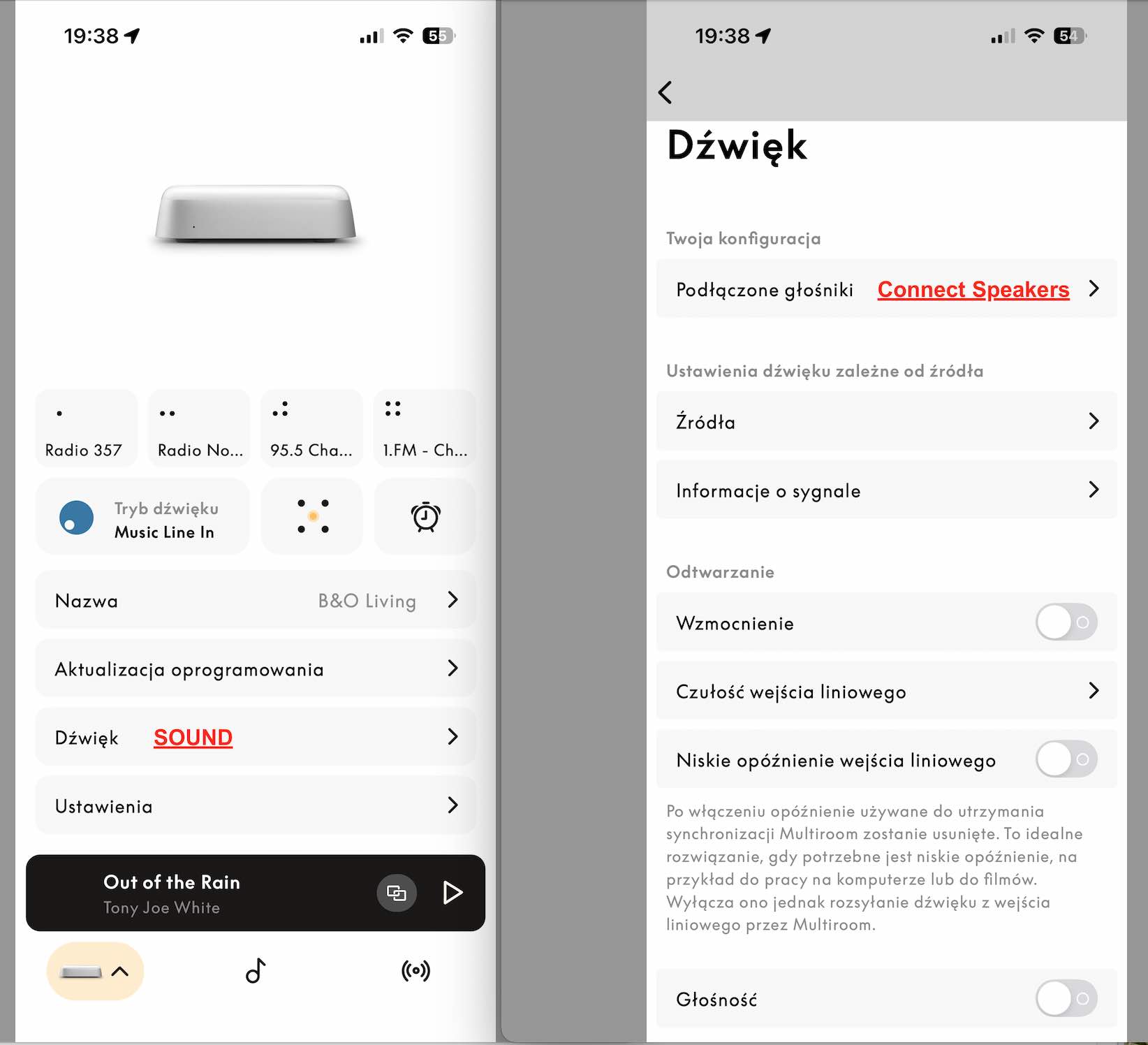
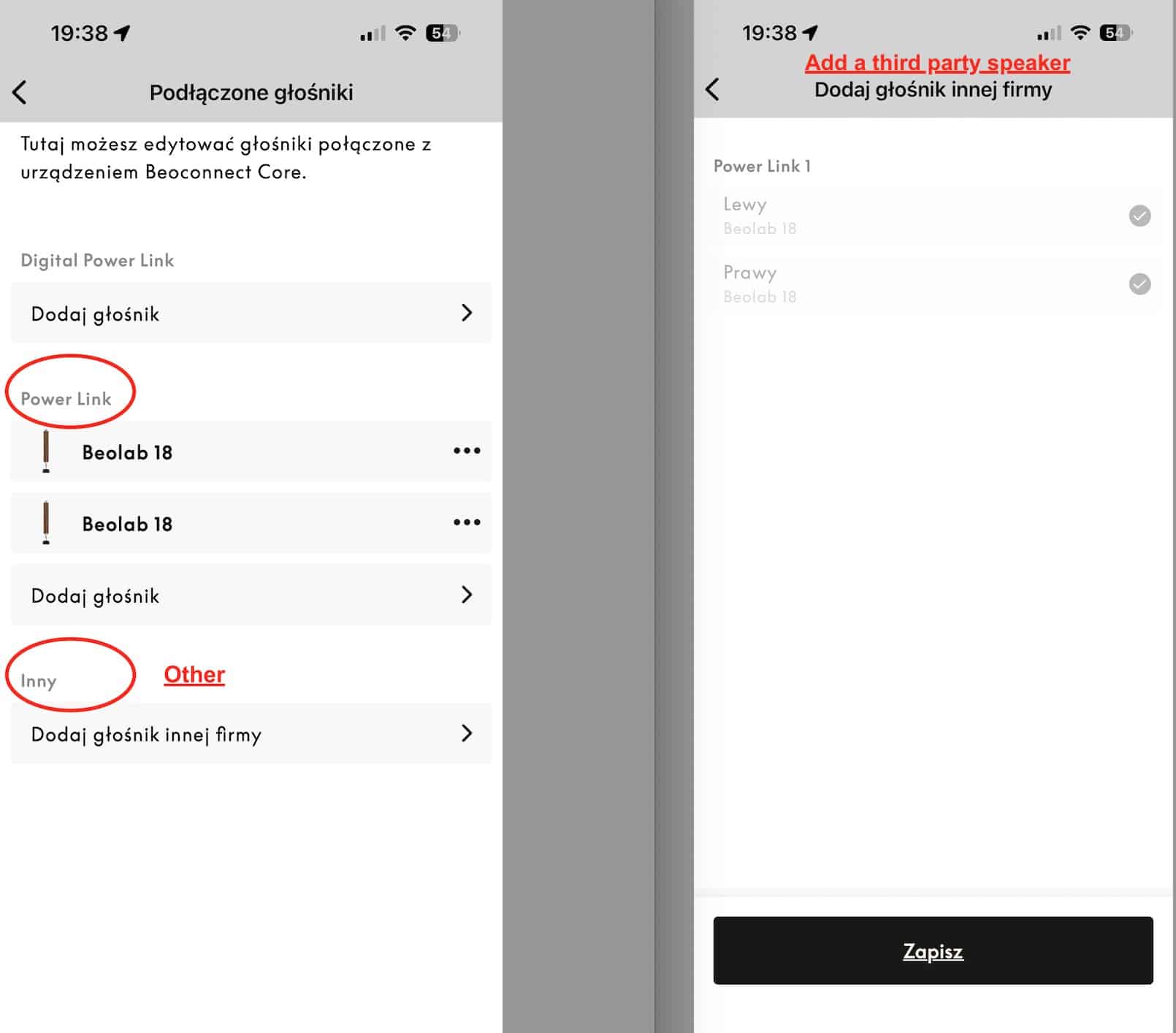
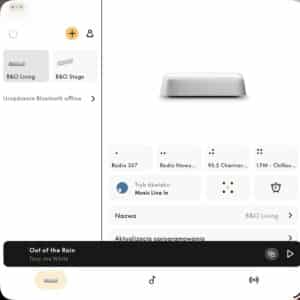
Hi everyone, I recently purchased the Bang & Olufsen Beoconnect Core and connected it to my Beolab 18 speakers. The setup works wonderfully – the sound quality is excellent, everything integrates smoothly with my other B&O products, and overall I’m very happy with the experience. However, I’ve run into a small visual issue within the B&O app. In both the promotional materials and the user manual, the connected speakers are shown as individual, visible elements on the main screen of the app (with their corresponding graphics). Unfortunately, in my case this visualization does not appear at all, and I can’t find any option that would enable it. Interestingly, it did show up once by accident – when I temporarily lost connection with one of my Beolab 18 speakers, the app displayed one Beolab 18 and another speaker that looked like a generic, non-B&O model. Unfortunately, I didn’t capture a screenshot at that moment. I’m attaching a photo from my app as well as the image from the user manual to illustrate the difference. Has anyone else experienced something similar? Maybe there’s a hidden setting, a particular update, or some workaround that enables this visual representation? Thanks in advance for any help, and warm greetings to all the forum members!  
You set up the 18s under "Connected Speakers", correct?

Location: Winter Park, FL

My B&O Icons:

Https://Beoworld.Org/Wp Content/Uploads/2025/01/Beolab 8 Https://Beoworld.Org/Wp Content/Uploads/2025/01/Beolab 8
Https://Beoworld.Org/Wp Content/Uploads/2025/01/Beolab 18 Https://Beoworld.Org/Wp Content/Uploads/2025/01/Beolab 18
Https://Beoworld.Org/Wp Content/Uploads/2025/01/Beolab 28 Https://Beoworld.Org/Wp Content/Uploads/2025/01/Beolab 28
Https://Beoworld.Org/Wp Content/Uploads/2025/01/Beolab 50 Https://Beoworld.Org/Wp Content/Uploads/2025/01/Beolab 50
Https://Beoworld.Org/Wp Content/Uploads/2025/01/Beolab 90 Https://Beoworld.Org/Wp Content/Uploads/2025/01/Beolab 90
Https://Beoworld.Org/Wp Content/Uploads/2025/01/Beoplay A1 Https://Beoworld.Org/Wp Content/Uploads/2025/01/Beoplay A1
Https://Beoworld.Org/Wp Content/Uploads/2025/01/Beoplay A9 Https://Beoworld.Org/Wp Content/Uploads/2025/01/Beoplay A9
Https://Beoworld.Org/Wp Content/Uploads/2025/01/Beoplay H95 Https://Beoworld.Org/Wp Content/Uploads/2025/01/Beoplay H95
Https://Beoworld.Org/Wp Content/Uploads/2025/01/Beoplay H100 Https://Beoworld.Org/Wp Content/Uploads/2025/01/Beoplay H100
Https://Beoworld.Org/Wp Content/Uploads/2025/01/Beoremote Halo Https://Beoworld.Org/Wp Content/Uploads/2025/01/Beoremote Halo
Https://Beoworld.Org/Wp Content/Uploads/2025/01/Beoremote One Https://Beoworld.Org/Wp Content/Uploads/2025/01/Beoremote One
Https://Beoworld.Org/Wp Content/Uploads/2025/01/Beosound 2 Https://Beoworld.Org/Wp Content/Uploads/2025/01/Beosound 2
Https://Beoworld.Org/Wp Content/Uploads/2025/01/Beosound Balance Https://Beoworld.Org/Wp Content/Uploads/2025/01/Beosound Balance
Https://Beoworld.Org/Wp Content/Uploads/2025/01/Beosound Edge Https://Beoworld.Org/Wp Content/Uploads/2025/01/Beosound Edge
Https://Beoworld.Org/Wp Content/Uploads/2025/01/Beosound Emerge Https://Beoworld.Org/Wp Content/Uploads/2025/01/Beosound Emerge
Https://Beoworld.Org/Wp Content/Uploads/2025/01/Beosound Explore Https://Beoworld.Org/Wp Content/Uploads/2025/01/Beosound Explore
Https://Beoworld.Org/Wp Content/Uploads/2025/01/Beosound Level Https://Beoworld.Org/Wp Content/Uploads/2025/01/Beosound Level
Https://Beoworld.Org/Wp Content/Uploads/2025/01/Beosound Shape Https://Beoworld.Org/Wp Content/Uploads/2025/01/Beosound Shape
Https://Beoworld.Org/Wp Content/Uploads/2025/01/Beosound Stage Https://Beoworld.Org/Wp Content/Uploads/2025/01/Beosound Stage
Https://Beoworld.Org/Wp Content/Uploads/2025/01/Beosound Theatre Https://Beoworld.Org/Wp Content/Uploads/2025/01/Beosound Theatre
Https://Beoworld.Org/Wp Content/Uploads/2025/01/Beovision Contour Https://Beoworld.Org/Wp Content/Uploads/2025/01/Beovision Contour
Https://Beoworld.Org/Wp Content/Uploads/2025/01/Beovision Harmony Https://Beoworld.Org/Wp Content/Uploads/2025/01/Beovision Harmony
The speakers sound great right from the start. Are they connected correctly? I used a PowerLink cable; it's hard to go wrong ;) The speakers are visible in the tab: Sound -> Connected Speakers -> PowerLink (photo attached) Below, there's also an "Other" option, presumably for connecting speakers from other companies. The BEO 18 speakers are also visible there, marked with a checkbox that can't be unchecked. As I mentioned earlier, the only time the speakers were visible on the "first screen" of the Beo Connect app was when the app had an error and removed one of the connected BEO 18 speakers. Then, on the app screen, I saw: 1x BEO 18 and 1x Other company speaker. Best regards
Post a Reply
Attach Files
Max 10MB per file. Images, videos, PDFs, documents, archives, and 3D models accepted.
Please Log In to Reply

You must be logged in as a BeoWorld member to post replies to forum threads.

Rejoining the server...

Rejoin failed... trying again in seconds.

Failed to rejoin.
Please retry or reload the page.

The session has been paused by the server.

Failed to resume the session.
Please retry or reload the page.